Works with your BuyBlock account
Sign in with the same Apple or Google account you use in the BuyBlock app on iPhone or Android. Items, cooldowns, and savings totals sync between your browser and your phone. New here? Just sign in to get started.
BuyBlock for Chrome
Add the item you're about to buy. BuyBlock researches prices, reviews and alternatives, shows you the report, then gives you a cooldown before you decide.
Chrome extensions don't run on mobile browsers yet. Open Chrome on your Mac, Windows, or Linux computer and visit buyblock.app/chrome from there to install.
The BuyBlock browser extension is available for Google Chrome on Mac, Windows, and Linux. Open Chrome and visit buyblock.app/chrome to install. A Safari extension is on the roadmap.


Free plan: 3 scans/month. Pro: 30 scans/month for $4.99/mo or $39.99/yr. Learn more.
Or scan QR code, email yourself the link, or just remember: buyblock.app/chrome
Safari extension is planned for a future release. Firefox and Edge are under evaluation.
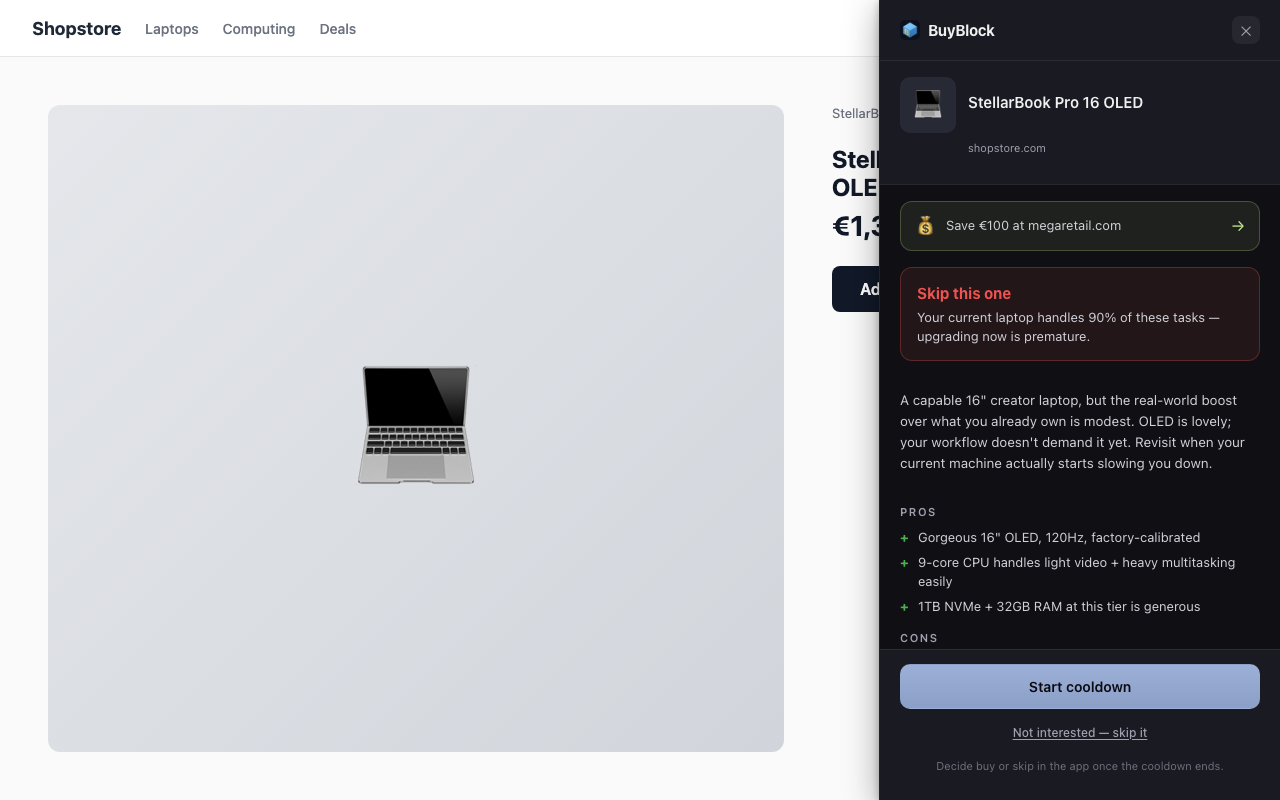
How it works in your browser
No new tabs. No tracking. Just a pause and a research report.
Amazon, eBay, Shopify, any retailer. BuyBlock sits quietly in the corner.
Pick 24, 48, or 72 hours. BuyBlock researches the product first — prices, reviews, alternatives — and your cooldown starts when the report is ready.
Read the report right away. When the timer ends, decide: buy, skip, or wait for a better price.
Sign in with the same Apple or Google account you use in the BuyBlock app on iPhone or Android. Items, cooldowns, and savings totals sync between your browser and your phone. New here? Just sign in to get started.